
Headphones are one of those items people use every day but rarely think about when setting up a workspace. They get tossed on the desk, draped over a chair, or hung precariously on a monitor corner. None of these choices feel like a problem—until something gets knocked over, the cable snags, or the headband slowly loses its shape.
That’s where small accessories like clamp-on headphone stands quietly earn their place. They don’t promise productivity miracles. They simply solve a recurring friction point: where your headphones live when you’re not wearing them.
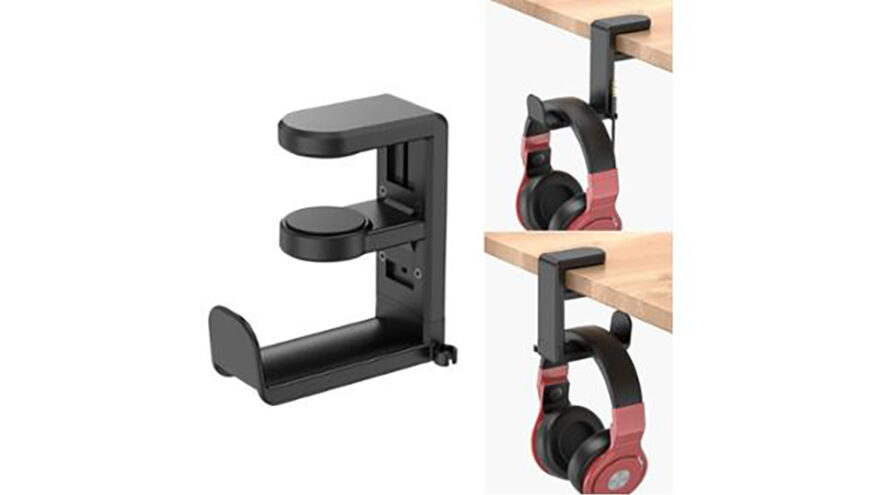
This article looks at clamp-on headphone stands as a category, using the EURPMASK-style desk clamp holder as a reference, and explains why this modest accessory often ends up being more useful than people expect.
The Hidden Cost of “Just Setting Them Down”
Leaving headphones on a desk feels harmless. But over time, several things tend to happen:
- Headphones slide onto keyboards or notebooks
- Cables tangle with mouse cords or charging cables
- Ear cups get compressed under papers or bags
- Headbands rest unevenly and slowly deform
- Headphones get knocked off the desk entirely
None of this happens dramatically. It’s slow, cumulative wear caused by not having a defined place for the gear.
A headphone stand isn’t about showing off equipment—it’s about reducing low-level damage and clutter over time.
What Makes Clamp-On Stands Different From Traditional Stands
Most people picture a headphone stand as a vertical post with a base that sits on the desk. Clamp-on stands take a different approach.
Instead of occupying desk space, they:
- Attach to the edge of the desk or shelf
- Hold headphones underneath or beside the surface
- Swing out when needed and tuck away when not
The EURPMASK-style clamp stand uses a padded clamp that grips desk edges within a specific thickness range and includes a swiveling arm and cable clip.
This design trades visibility for efficiency.
Why Desk Space Matters More Than People Admit
Many modern desks are smaller than traditional office furniture. Home offices, dorm rooms, and shared workspaces often involve:
- Compact desks
- Limited surface area
- Multiple devices competing for space
In these environments, every square inch counts.
A clamp-on headphone stand:
- Removes one object from the desk surface
- Reduces visual clutter
- Keeps frequently used gear within reach without crowding
For small setups, this can noticeably improve how the workspace feels—even though nothing “productive” was added.
Ergonomics and Daily Use: Convenience Adds Up
A well-placed headphone hanger changes daily behavior in subtle ways.
Instead of:
- Sliding headphones aside
- Stacking them on books
- Leaving them on the keyboard
You build a simple habit:
- Reach
- Hang
- Done
That small change:
- Reduces cable tangles
- Prevents accidental drops
- Keeps headphones in the same place every time
Consistency matters more than aesthetics when it comes to desk organization.
Clamp-On vs Adhesive vs Desktop Stands
Clamp-on stands aren’t the only option, and understanding the alternatives helps clarify when they make sense.
Adhesive mounts
Pros:
- Inexpensive
- Easy to install
- Minimal hardware
Cons:
- Adhesive weakens over time
- Can damage surfaces
- Limited repositioning
These work best for lightweight headphones and temporary setups.
Desktop stands
Pros:
- Stable
- Compatible with any desk
- Good for heavier headphones
Cons:
- Occupy desk space
- More visually prominent
- Can become clutter magnets
Desktop stands are ideal when desk space isn’t a concern.
Clamp-on stands
Pros:
- Free up desk surface
- Removable without residue
- Adjustable placement
- Discreet appearance
Cons:
- Depend on desk edge shape
- Limited by clamp width
- Not ideal for extremely heavy gear
Clamp-on stands sit in the middle ground: more secure than adhesive, less bulky than desktop stands.
Desk Compatibility: The Most Important Buying Check
Before buying a clamp-on stand, desk compatibility matters more than brand or style.
Things to check:
- Desk thickness: Many clamps support a specific range (often around 0.3–1.5 inches).
- Edge shape: Straight edges grip best; heavily beveled edges may reduce stability.
- Material: Softwood desks may compress slightly under clamp pressure.
Most complaints about clamp stands come from ignoring these basics.
Weight and Headphone Type Considerations
Clamp-on stands are typically designed for:
- Standard over-ear headphones
- Gaming headsets
- Office headsets
They may struggle with:
- Uunusually heavy audiophile headphones
- Metal-framed studio gear
- Dual-headset storage
For heavier gear, distributing weight evenly across the hanger and ensuring firm clamp tension is essential. Some users prefer desktop stands for peace of mind with expensive headphones.
Cable Management: A Small Feature That Matters
Many clamp-on stands include a built-in cable clip or hook. This feature often looks minor but solves a persistent annoyance.
Without cable management:
- Cords drag on the floor
- Wheels roll over cables
- Connectors get stressed
A simple clip keeps the cable looped neatly, reducing wear and accidental tugs. Over time, this helps preserve both the cable and the headphone jack.
Installation and Adjustment: No Tools, No Commitment
One advantage of clamp-on stands is reversibility.
Installation usually involves:
- Tightening the clamp by hand
- Positioning the arm
- Adjusting swivel orientation
No drilling. No adhesives. No permanent marks.
This makes clamp-on stands ideal for:
- Renters
- Shared spaces
- Frequently rearranged setups
- Temporary desks
If you change your layout, the stand moves with you.
Aesthetics vs Utility: Keeping It Subtle
Clamp-on stands tend to be visually understated. When folded under the desk, they’re nearly invisible.
This appeals to users who:
- Want a clean, minimal desk
- Dislike accessory clutter
- Prefer tools that disappear when not in use
It’s a functional choice rather than a decorative one.
Who Benefits Most From Clamp-On Headphone Stands
Clamp-on stands are particularly useful for:
- Gamers who use headsets daily
- Remote workers on frequent calls
- Students with compact desks
- Anyone juggling multiple cables
- People who value organization without visual noise
They’re less useful for:
- Large studio desks with ample space
- Collectors displaying premium headphones
- Setups with unconventional desk edges
Common Mistakes to Avoid
Clamping to unstable surfaces
Thin shelves or flexible desk edges can cause wobble.
Over-tightening the clamp
This can damage softer desk materials.
Mounting too far from reach
The stand should be convenient, not decorative.
Ignoring swivel clearance
Make sure the arm doesn’t hit drawers or legs when rotated.
Practical Placement Tips
- Mount on the side opposite your dominant mouse hand
- Keep it within natural arm reach
- Avoid mounting near knee space
- Test swivel range before tightening fully
A few minutes of adjustment can prevent long-term annoyance.
Durability and Longevity Expectations
Clamp-on stands in this category are typically made from reinforced plastic with rubber padding. With normal use, they tend to last years.
Long-term durability depends on:
- Clamp pressure
- Desk material
- Headphone weight
- Frequency of movement
They’re not indestructible—but they don’t need to be. Their job is simple.
Final Perspective
A clamp-on headphone stand isn’t an exciting purchase. It won’t improve sound quality or boost productivity metrics. What it does is quietly remove a small, recurring frustration from your daily routine.
By giving your headphones a consistent, out-of-the-way home, it helps keep desks cleaner, cables safer, and gear better protected. For compact workspaces and daily headset users, it’s one of those accessories that feels unnecessary—until you start using it and wonder why you waited.