
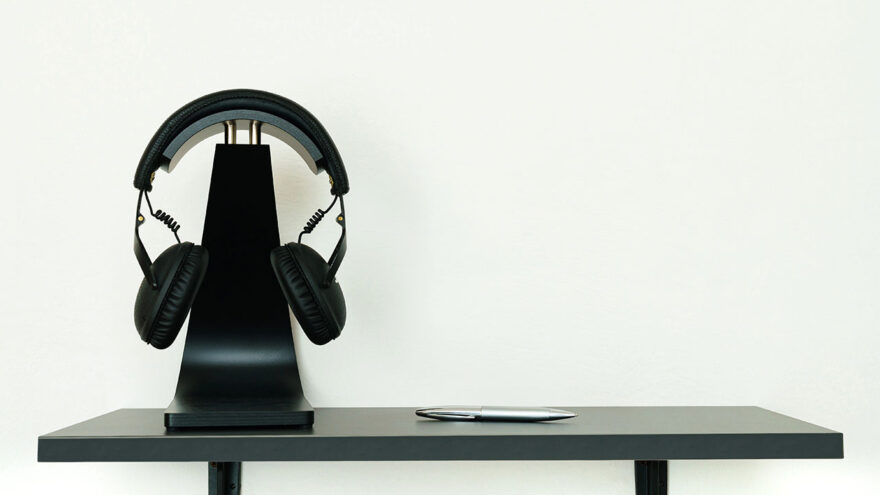
Headphones are one of the most used accessories on modern desks, yet they’re often the least intentionally stored. Many people spend time choosing the right headset for comfort and sound, only to leave it resting on a keyboard, hanging from a chair, or draped over a monitor.
That’s where headphone stands come in. They’re simple accessories, but the type of stand you choose affects desk space, headphone longevity, and daily convenience more than most people expect.
This guide compares clamp-on headphone holders and traditional desktop stands based on how they perform in real workspaces—not on looks or marketing claims.
Why Headphone Storage Matters More Than It Seems
Headphones are built to be worn, not tossed aside. When they don’t have a defined resting place, small problems compound over time:
- Headbands rest unevenly and slowly lose shape
- Ear cushions compress against hard surfaces
- Cables get pinched or dragged
- Headphones get knocked to the floor
None of these issues are dramatic on their own, but they shorten the usable life of the gear.
A proper stand doesn’t just organize—it reduces wear by creating consistency.
The Two Main Categories of Headphone Stands
Most headphone storage solutions fall into one of two categories:
- Clamp-on holders that attach to a desk edge or shelf
- Desktop stands that sit directly on the desk surface
Each solves the same problem in a different way, and neither is universally better.
Clamp-On Headphone Holders: Strengths and Trade-Offs
Clamp-on holders mount to the edge of a desk or shelf and suspend the headphones underneath or beside the surface.
Key advantages
Desk space preservation
Clamp-on holders free up desk surface area entirely. This matters in compact setups where every inch is already claimed by a keyboard, monitor, or notebook.
Low visual footprint
When folded under the desk, clamp holders are nearly invisible. This appeals to people who want their workspace to feel clean and uncluttered.
Flexible placement
They can usually be moved without tools, making them ideal for renters, shared desks, or frequently rearranged setups.
Integrated cable management
Many include a small hook or clip that keeps cables from dangling, reducing strain on connectors.
Trade-offs to consider
Desk compatibility matters
Clamp holders depend on desk thickness and edge shape. Heavily beveled or unusually thick desks may not work well.
Weight limitations
Most clamp-on holders are designed for standard over-ear headphones and gaming headsets. Extremely heavy studio or audiophile headphones may feel more secure on a desktop stand.
Potential for wobble if poorly mounted
Incorrect tightening or mounting on flexible surfaces can reduce stability.
Clamp-on holders are about efficiency and minimalism rather than display.
Desktop Headphone Stands: Strengths and Trade-Offs
Desktop stands sit on the desk and support headphones from a vertical post or cradle.
Key advantages
High stability
A weighted base provides consistent support, making desktop stands well suited for heavier headphones.
Universal compatibility
They don’t rely on desk edges. Any flat surface works.
Better for long-term headphone care
Well-designed cradles distribute weight evenly across the headband, which can help preserve shape over time.
Easy to position
No installation required—just place and use.
Trade-offs to consider
Uses desk space
Desktop stands occupy surface area, which can feel wasteful on smaller desks.
More visually prominent
They’re always visible, which may or may not match your aesthetic preferences.
Less flexible for reconfiguration
They’re easy to move, but they always take up room wherever they go.
Desktop stands are better for stability and display, but they demand space.
Desk Size: The First Deciding Factor
Desk size alone often determines the right choice.
- Small desks (student desks, apartment setups): Clamp-on holders usually make more sense.
- Large desks (studio desks, dedicated offices): Desktop stands are easy to accommodate.
If your desk already feels crowded, removing even one object from the surface can noticeably improve usability.
Headphones are one of the most used accessories on modern desks, yet they’re often the least intentionally stored. Many people spend time choosing the right headset for comfort and sound, only to leave it resting on a keyboard, hanging from a chair, or draped over a monitor.
That’s where headphone stands come in. They’re simple accessories, but the type of stand you choose affects desk space, headphone longevity, and daily convenience more than most people expect.
This guide compares clamp-on headphone holders and traditional desktop stands based on how they perform in real workspaces—not on looks or marketing claims.
Why Headphone Storage Matters More Than It Seems
Headphones are built to be worn, not tossed aside. When they don’t have a defined resting place, small problems compound over time:
- Headbands rest unevenly and slowly lose shape
- Ear cushions compress against hard surfaces
- Cables get pinched or dragged
- Headphones get knocked to the floor
None of these issues are dramatic on their own, but they shorten the usable life of the gear.
A proper stand doesn’t just organize—it reduces wear by creating consistency.
The Two Main Categories of Headphone Stands
Most headphone storage solutions fall into one of two categories:
- Clamp-on holders that attach to a desk edge or shelf
- Desktop stands that sit directly on the desk surface
Each solves the same problem in a different way, and neither is universally better.
Clamp-On Headphone Holders: Strengths and Trade-Offs
Clamp-on holders mount to the edge of a desk or shelf and suspend the headphones underneath or beside the surface.
Key advantages
Desk space preservation
Clamp-on holders free up desk surface area entirely. This matters in compact setups where every inch is already claimed by a keyboard, monitor, or notebook.
Low visual footprint
When folded under the desk, clamp holders are nearly invisible. This appeals to people who want their workspace to feel clean and uncluttered.
Flexible placement
They can usually be moved without tools, making them ideal for renters, shared desks, or frequently rearranged setups.
Integrated cable management
Many include a small hook or clip that keeps cables from dangling, reducing strain on connectors.
Trade-offs to consider
Desk compatibility matters
Clamp holders depend on desk thickness and edge shape. Heavily beveled or unusually thick desks may not work well.
Weight limitations
Most clamp-on holders are designed for standard over-ear headphones and gaming headsets. Extremely heavy studio or audiophile headphones may feel more secure on a desktop stand.
Potential for wobble if poorly mounted
Incorrect tightening or mounting on flexible surfaces can reduce stability.
Clamp-on holders are about efficiency and minimalism rather than display.
Desktop Headphone Stands: Strengths and Trade-Offs
Desktop stands sit on the desk and support headphones from a vertical post or cradle.
Key advantages
High stability
A weighted base provides consistent support, making desktop stands well suited for heavier headphones.
Universal compatibility
They don’t rely on desk edges. Any flat surface works.
Better for long-term headphone care
Well-designed cradles distribute weight evenly across the headband, which can help preserve shape over time.
Easy to position
No installation required—just place and use.
Trade-offs to consider
Uses desk space
Desktop stands occupy surface area, which can feel wasteful on smaller desks.
More visually prominent
They’re always visible, which may or may not match your aesthetic preferences.
Less flexible for reconfiguration
They’re easy to move, but they always take up room wherever they go.
Desktop stands are better for stability and display, but they demand space.
Desk Size: The First Deciding Factor
Desk size alone often determines the right choice.
- Small desks (student desks, apartment setups): Clamp-on holders usually make more sense.
- Large desks (studio desks, dedicated offices): Desktop stands are easy to accommodate.
If your desk already feels crowded, removing even one object from the surface can noticeably improve usability.
Headphone Weight and Value Considerations
Not all headphones stress stands equally.
Lightweight to mid-weight headphones
- Gaming headsets
- Office headsets
- Standard consumer over-ears
These work well with either stand type.
Heavier or premium headphones
- Metal-framed studio models
- Audiophile headphones with wide headbands
These benefit from:
- Wider cradles
- Heavier bases
- Stable support
Desktop stands often feel more reassuring in these cases.
Cable Management: A Quiet Differentiator
Cable handling is an often-overlooked factor.
Clamp-on holders frequently include:
- Cable clips
- Hooks
- Under-desk routing
This keeps cables:
- Off the floor
- Away from chair wheels
- Free from constant bending
Desktop stands usually rely on draping cables loosely, which is fine but less controlled.
If your headphones are wired, clamp-on holders often have an edge here.
Daily Workflow Impact
The best stand is the one that fits your habits.
Clamp-on holders:
- Encourage a quick “hang and go” habit
- Reduce surface clutter
- Work well for frequent on-and-off use
Desktop stands:
- Encourage careful placement
- Make headphones easy to see and grab
- Suit users who treat headphones as a centerpiece
Neither is objectively better—only more aligned with different behaviors.
Installation and Setup Differences
Clamp-on
- Requires desk edge measurement
- Needs initial adjustment
- Easily removed or repositioned
Desktop
- No setup
- Immediate use
- Fixed footprint
If you prefer zero setup, desktop wins. If you value adaptability, clamp-on wins.
Durability and Longevity
Clamp-on holders:
- Usually plastic with rubber padding
- Durable for everyday use
- Depend on clamp tension and desk material
Desktop stands:
- Often metal or weighted plastic
- Fewer moving parts
- Less dependent on desk construction
Both last years when used appropriately.
Common Mistakes to Avoid
- Choosing clamp-on without checking desk thickness
- Over-tightening clamps on softwood desks
- Using narrow cradles for wide headbands
- Mounting holders where knees or drawers interfere
Most dissatisfaction comes from mismatch, not poor quality.
A Simple Decision Framework
Choose a clamp-on holder if:
- Desk space is limited
- You want minimal visual clutter
- Your headphones are mid-weight
- You value cable management
Choose a desktop stand if:
- Desk space is abundant
- Your headphones are heavy or premium
- You want maximum stability
- Display matters to you
Final Perspective
Headphone stands don’t improve sound quality. They improve how your desk works.
Clamp-on holders excel at efficiency and space savings. Desktop stands excel at stability and presentation. The right choice depends on your desk, your headphones, and your habits—not on price or appearance alone.
When headphones have a consistent resting place, they last longer, clutter disappears, and daily use becomes friction-free. That’s the real value of choosing the right stand.
Not all headphones stress stands equally.