
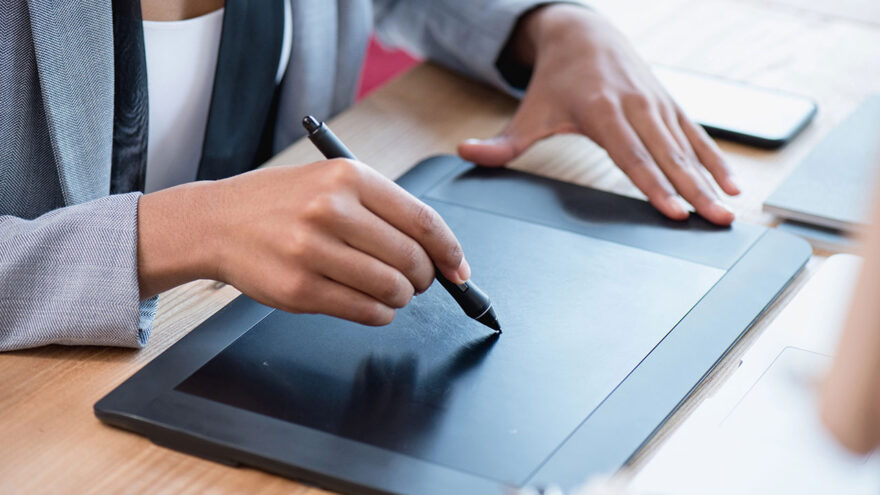
For many people curious about digital drawing, photo editing, or handwritten input, the biggest obstacle isn’t creativity—it’s hardware complexity. Display tablets can be expensive. Advanced pen features can feel overwhelming. And using a mouse for creative work often feels imprecise and unnatural.
That’s where compact, non-display pen tablets like the Huion Inspiroy H640P fit in. They offer pen-based control without the cost, size, or learning curve of professional-grade setups. This article takes a practical look at what the H640P does well, where it has limits, and who it’s actually designed for.
What a Pen Tablet Like the H640P Is Meant to Replace
A pen tablet doesn’t replace a monitor—it replaces a mouse or trackpad.
Instead of dragging a cursor with your hand resting on a desk, you:
- Move a pen across a tablet surface
- Translate that movement directly to the screen
- Gain pressure-sensitive control
For drawing, editing, annotating, or teaching, this can feel far more natural than traditional input devices.
The H640P is firmly positioned as an entry-level to intermediate pen tablet designed to make that transition accessible.
Core Hardware Overview (Without the Spec Hype)
The H640P is intentionally simple.
Key elements include:
- A compact drawing surface
- A battery-free stylus
- Programmable shortcut keys
- USB connectivity
- Driver-based customization
There’s no built-in screen, no tilt detection, and no wireless charging complexity. That simplicity is part of its appeal.
Battery-Free Stylus: Why This Matters More Than It Sounds
One of the most underrated features of modern pen tablets is the battery-free stylus.
With the H640P:
- The pen never needs charging
- There are no batteries to replace
- Weight stays consistent
- Input latency remains predictable
For long sessions, this matters. There’s no interruption, no degradation as a battery drains, and no extra maintenance. You pick up the pen and it works—every time.
Pressure Sensitivity in Real Use
The H640P supports high levels of pressure sensitivity, which translates into:
- Thicker lines when pressing harder
- Lighter strokes with gentler pressure
- More expressive control overall
In practice, this is most noticeable when:
- Sketching
- Painting
- Retouching photos
- Writing naturally
While professionals may demand tilt recognition or ultra-fine calibration, the pressure response here is more than sufficient for learning, practice, and serious hobbyist work.
Tablet Size: Small on Paper, Practical in Reality
At first glance, the active area may seem small compared to larger tablets. But size is contextual.
Advantages of the compact footprint:
- Fits easily on crowded desks
- Portable for travel or classrooms
- Less arm movement required
- Quicker adaptation for beginners
For note-taking, editing, and line-based drawing, the size is often ideal. For wide sweeping canvas gestures, larger tablets may feel more natural—but they also require more space and cost.
Programmable Express Keys: Small Feature, Big Workflow Impact
The H640P includes six programmable express keys.
These can be mapped to:
- Undo
- Redo
- Brush size adjustments
- Zoom
- Eraser
- Modifier keys
Once configured, these shortcuts reduce keyboard reliance and speed up repetitive tasks. For beginners, they also help build muscle memory for common actions.
They’re not mandatory—but once used, they’re hard to give up.
Compatibility Across Devices and Platforms
One of the H640P’s strengths is broad compatibility.
It works with:
- Windows
- macOS
- Linux
- Android (with supported devices)
This makes it useful across:
- Home computers
- School laptops
- Shared environments
For students or hybrid workers, that flexibility means the tablet can move with you rather than being locked to one machine.
Setup and Learning Curve
Pen tablets can feel unintuitive at first because:
- Your hand looks down
- Your eyes look at the screen
- Coordination must adapt
The H640P’s compact size shortens this learning curve. Most users adapt within a few hours of use.
Installing the driver unlocks:
- Pressure curve adjustment
- Button mapping
- Orientation changes
Once set up, daily use becomes second nature.
Common Use Cases Where the H640P Excels
Digital Art and Illustration
For beginners and intermediate artists, the tablet offers responsive input without overwhelming features.
Photo Editing and Retouching
Precise brushing, masking, and dodge/burn work is far easier with a pen than a mouse.
Handwritten Notes and Annotations
Students and educators often use pen tablets to mark PDFs, annotate slides, or write equations naturally.
Teaching and Screen Recording
Pen tablets shine in virtual teaching, allowing instructors to draw and explain visually in real time.
Where the H640P Has Limits
No tool fits everyone.
Limitations to be aware of:
- No built-in display
- No tilt sensitivity
- Smaller active area than professional tablets
- Wired connection only
These are trade-offs, not flaws. Understanding them avoids disappointment.
How It Compares to Display Tablets
Display tablets let you draw directly on the screen—but they:
- Cost significantly more
- Take up more desk space
- Require more setup
- Introduce posture considerations
For many users, especially beginners, the extra cost and complexity don’t translate into better results. A pen tablet builds foundational skills without distraction.
Durability and Long-Term Use
Pen tablets like the H640P are low-maintenance.
With normal use:
- The surface holds up well
- The stylus lasts for years
- Drivers receive periodic updates
Replacing nibs occasionally is standard, but overall upkeep is minimal.
Who This Tablet Is Best For
The H640P is particularly well suited for:
- Beginner digital artists
- Students and educators
- Hobbyist designers
- Remote workers annotating documents
- Anyone transitioning from mouse to pen input
It’s less ideal for:
- Professionals needing tilt and display integration
- Artists who prefer large sweeping movements
- Users who want wireless-only setups
Practical Tips for New Users
- Start with short sessions to build coordination
- Customize pressure curves early
- Map express keys to habits you already use
- Practice simple shapes before complex artwork
- Don’t rush the learning curve
Comfort comes with repetition.
Final Perspective
The Huion Inspiroy H640P succeeds because it knows exactly what it’s meant to be: an accessible, reliable entry point into pen-based digital work.
It doesn’t chase premium features or flashy design. Instead, it focuses on responsiveness, simplicity, and compatibility—qualities that matter far more when learning or working day to day.
For anyone curious about drawing, editing, annotating, or teaching with a pen, this tablet offers a low-risk, high-value way to get started without committing to an expensive ecosystem.